 The SSD Review The Worlds Dedicated SSD Education and Review Resource |

Understanding SSDs Performance and Implications
Today’s SSD close up is going to teach us the most valuable thing we can ever learn about an SSD.
This is the fourth paper in a series of articles that explain the benefits, types and components of a solid state drive and will go so far as to make up our SSD Beginners Guide . Each article is designed to be easily understood and will enable the reader to become proficient in every aspect of the SSD as it relates to their specific computing needs.
INTRODUCTION
Learning of a new technology and what it can do for us as consumers is somewhat similar to walking into a room blindfolded only to learn that the lights are out once the blindfold has been removed. Try to find the light switch now right? The world of solid state drives is no different as many are now buying Ultrabook computers only to have to come here to learn what an SSD is and why their new system hasn’t any hard drive. Then again many may be here having an idea and hoping to migrate from a hard drive to an SSD.
Solid state drives are an amazingly fast move forward in the world of computers and, unfortunately, their purchase is much the same as we described above where consumers purchase blindly based on high performance numbers that they will never use. This article is written to dispel the fallacies of ‘high sequential’ speed advertisement and help you along with a key SSD performance speed that you should be looking at in your SSD purchase, the one that will demonstrate very visible computer upgrade.
We are not exaggerating when we state that this is probably going to be the single most important piece of information you will ever learn about solid state drives.
THE SSD MANUFACTURERS BLUFF
Lets get right to the point shall we? Take a little look at these performance scores and tell me what SSD you would buy.
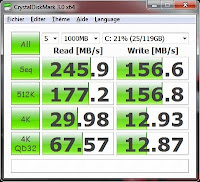 Ok… A few of you got it but I am disappointed in most so, lets try again. Look carefully at the left performance results below and then the right. Which setup would you believe will result in faster visible performance for the typical user?
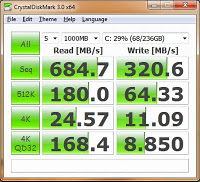
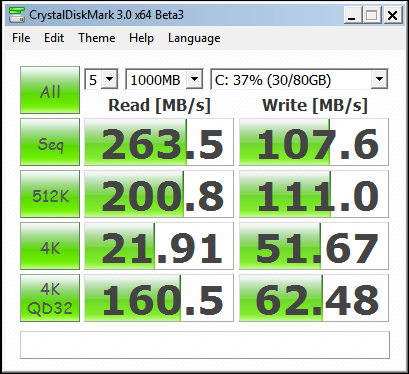
Thorough examination should have resulted with your selection of the result on the right. No? I know, I know¦ Some of you are about to write me off as a lunatic and and find another article to help out with your purchase and, in fact, I even cheated a bit by using the performance score of an old RAID configuration to serve my purpose a bit further. I’ll make you a deal.
Give me just a few minutes and I will change your mind completely to the way you look at the performance of a solid state drive.
TYPICAL COMPUTER USE AND TRANSFER SPEEDS
When first considering the purchase of an SSD, most will immediately look at performance specifications in order to determine what SSD is best. Unknowingly, they will quickly choose in awe of lightning fast speeds such as 550MB/s read and 520MB/s write that we are seeing in today’s solid state drives. After all, a SSD with a speed of 520MB/s must be faster than one capable of only 415MB/s right?
The answer is both yes and no. A bit of an understanding of disk access percentages is necessary to be able to intelligently decide specifically what SSD is best for you. Many may have seen an older version of this article where the disk access results were slightly different than we see below. I believed it imperative to attain my own test sample and the following results were attained at the time of this article.
Top 5 Most Frequent Drive Accesses by Type and Percentage:
- -4 Read (8%)
- -4K Write (58%)
- -512b Write (5%)
- -8k Write (6%)
- -32k Read (5%)
Top 5 account for: 80% of total drive access over test period
Largest access size in top 50:256K Read (-1% of total)
Using Microsofts Diskmon, I simply monitored my typical computer usage in doing things such as using the internet, running applications, playing music etc. In short, I did my best to recreate the computer use of a typical user and then used the program to break down the percentage that specific disk transfer speeds were being utilized. The above results were calculated through a ten minute test period during which results were supplied throughout the test. This is a simple test that anyone could recreate once they have downloaded the software.
This is a very interesting test. It does indeed shed light on a fallacy of typical SSD advertising.
One other thing it sheds light on is even more surprising. How wasteful the OS is of write cycles. Look at the numbers again. 56.53% of all accesses in his test were 8K writes. 8K reads were nuber 2 at only 7.6%. When is the computer reading all of this data that it is writing? If you do some math on the full results does it show something closer to balance in total K read versus total K written? Given that JEDEC is rightfully basing the new endurance spec for SSDs on Terabytes Written, wasteful writing by the OS and programs is something to watch out for…
I certainly agree with you on principle, but I wonder how much of that data could be writes to the same block. Consider a program with a while loop and a counter. If I only care about the value of the counter after the while loop’s exit condition is met, I may potentially be writing a value there many times before a single read is needed. Surely other similar situations also exist. (Granted, in this trivial case, that information need not be stored to disk.)
Also keep in mind that PCs are running more and more .Net applications, not to mention Windows, Office, and other Microsoft Software. At least some of the code, if not half or more, is MSIL, not machine language. As the CLR interprets the MSIL, it is constantly upgrading the code to Native Mode. That could account for some of the 8K writes as well.
I would love to hear your analysis and recommendations on using a RAM disk in conjunction with an SSD. I’m doing that now and have installed my two most write-intensive applications (stock charting and anti-virus) into it as well as locating my web browser caches (IE and Firefox) and user temp file locations into it. I’m using DataRam’s free RAMDisk driver.
I bring this up as I’ve read that Windows 7 caches much of what’s in RAM on the disk anyway – thus negating my “protecting” my SSD from the writes of applications writing to the RAMDisk.
Not sure on Win7, but I assume it shouldn’t be much different…
In WinXP, for something like 4 years or so, I disabled the paging file altogether. What this means are 2 things:
1 – (the bad) if you do not have enough RAM windows will simply tell you so and if you use more, one of the programs will get closed. Nowadays 4Gb should take care of most (95%) of situations, 8Gb if 4Gb doesn’t cut it will solve your problems;
2 – (the great) Never again will windows copy something out of the RAM into the disk in order to have available RAM. This means you get a faster computer, no matter if using SSD or HDD.
Btw, anti-virus are READ intensive, they hardly ever write anything and the program itself should probably be (most or all of it) in memory anyway. Even more so, anti-virus reads the rest of the disks to check for viruses, so I’m not sure it helps much to have it on a ramdisk (that is considering no page file as mentioned above and that it is itself loaded to memory).
Last notes: if you can, you should try to make the “temporary” directories (the main windows one and at least the browser caches as well as any other that you may remember) part of the RAMDisk. Now that should show an interesting improvement, keep you system clean from those useless files, and take the write percentage down to a LOT lower levels.
Q, I had my paging file disabled for a long time, too.
In the end, I did some measurements, and was quite surprised: while I felt good having the paging file disabled, it actually did nothing for my computers performance.
In the end I did not bother disabling it after the last reinstall, since it does not help measured performance in any way, and instead can pose problems if you run out of memory.
SITE RESPONSE: I have been the biggest advocate of ‘no pagefile’ for years and have never said that it alone will increase performance. I have also stated that one needs to measure their memory use carefully, however, with the onset of Win7 and its memory allocation and 4GB ram, you are golden. The ONLY thin that pagefile can do is to provide you with a dumplog should your system crash…which it never will.
At the end of the day, why do you want processes running that serve no purpose?
Q: It’s important to note that a 32-bit Windows system cannot use more than 4 GB of RAM, even with Physical Address Extension enabled. As such, your 8 GB suggestion wouldn’t improve things at all unless the user also upgraded to a 64-bit OS. Even then, the Windows 7 Starter version is limited to 2 GB RAM.
WOW… now I am noways close to even writing code much less really knowing exactly where and the inter reaction too all the terms you used to explain your view of the subject. However I did understand what you were talking about in terms of it’s actual event/product to the operating system……….thanks guys really insightful.
Gonzo
SITE RESPONSE: Thank you for the favorable return.
The 4k read chart above, was that conducted on 34nm or 25nm NAND? I’ve heard recently that the OCZ Vertex 2 has been shipping with 25nm and everyone is reporting much slower response times…your thoughts??? I just bought a Vertex 2 but I don’t know if it will arrive as 34nm or 25nm….
Who cares about MTBF anyway? If an SSD is estimated to fail in three years one should rather upgrade to the newer one anyway.
I note that the chart specifies the C300 for Crucial. Will the results be consistent / comparible to the C400 because it is shipping with 25nm flash.
I am looking at the Crucial C400 64G in particular as, ahem, an OS and pagefile drive. Is this something I should consider of the Crucial C400 series?
The C300 and C400 series drives are totally different entities. The C400 also has different performance levels for 64/128 and 256 SSDs. For simply the pagefile and OS drive, it might be a wise choice.
Good read indeed, I had only just started disabling the swapfile some 6 or so months ago on a few machines, the older ones (xp) felt a real improvement.
I was considering a small SSD for a while, a SATA II at first, then I benchmarked my current 1tb drive and decided against the upgrade. I then considered the Revodrive which leads to my question.
Does your final chart depict the results of testing the Revodrive x2 or two revodrive’s in an array?
Seeing that the OCZ drive’s are actually the best drives on the market came as a bit of a surprise (and a disappointment) to be honest!
Most of the performance discrepancies of a drive at different size read/writes will be a result of the filesystem you use. Try a different FS, format with a different size block size and you will get drastically different results.
why do 1K writes figure so highly when a typical Windows NTFS disk has 4K clusters and the minimum write size is therefore 4K? Also what is this ‘typical computer’? Is it paging like mad due to insufficient RAM?
Thank you Les Tokar fory insightful contribution. Now being old and senile(66) I need a bit of further practical clarification. I am about to pull the trigger in investing a big chunk of my retired person on low fixed income savings in one of these SSD
I have 3 basic questions:
The options i have been considering are a Intel 320 Series 160GB (Sata II right?) vs a OCZ Vertex Max Iops Sata III or a Crucial C300(Sata III) of comparable volume factors. In terms of your comparison in the most prevalent activities a Drive is supposed to engage in,
1 what would be your recommendations and why?
My system has a Dell proprietary Motherboard, running an Intel Core 2 Quad Core (non threaded) Q9550 running at 2.83 MHz with. 6 GB of Ram DDR2 6400 240 pins 2x2GB + 2x2GB and nVidia GeForce 1 GB 240GTS video card, .
Dell tells me that my Desktop PC supports (or contains) Sata III ports.
2. From the perspective of the random access you mentioned which is the best of the 3 options which comes second and which third?.
I know we may be comparing apples and oranges given the Sata II vs Sata III differences but I also know of Intel’s reputation ffor quality and advance leadership in technology over the rest of the pack.
From the perspective oof bang for my buck in terms of price vs what i get and with these costs e.g.:the Intel processor would cost me $130, the OCZ $220 and the Crucial $220.
3. If you were me, knowing what you know and with my system’s other components -and compatibility issues- what would you recommend and why
I would appreciate your response.
Thank you kindly.
I am sorry….I need to make 2 important corrections, (as this site does not seem to offer ‘edit’ options of the original post)
1. the size of all 3 SSD is 120 GB (and not 160GB as it says the Intel is)
and
2.”From the perspective oof bang for my buck in terms of price vs what i get and with these costs e.g.:the Intel processor would cost me $130, the OCZ $220 and the Crucial $220″ << it says in there 'Intel 'processor' …it should have read "Intel SSD
would cost me $130…….."
I am sorry but I dont know where you are reading this info. The Intel was, in fact a 160GB.
For suggestions such as this I recommend carrying this question to our Forums for group examination and response…It is always better addressed by a number of experienced people.
Thank you for the info — referred by PommieB – Extremeoverclocking forms
PommieB is a good man and I am glad it helped.
I does not make sense to me that READING large numbers of DLLs would determine that 4K WRITES should be the most crucial statistic.
The test results are self explanatory and can be duplicated by anyone; this being the reason that I linked the download of the program. 4k writes accounted for 58% of disk access in my test and I can state that another site membert tested as well and found similar.
The most important observation you can make is that the number of writes FAR exceed reads rergardless what application you start or activity you complete. You can monitor this on your system and return with your results if you like.
I don’t disagree with 4K writes being the most common. But the article seems to state that reading DLLs is the main reason behind the large number of 4K writes.
“These DLLs are very small in size and are loaded through 4-8kb random disk access … In other words, the 4kb random write access is the single most crucial access”
Your top 5 percentages are confusing. So much time writing. Not enough data.
Also the 4 benchmarks arent titled, so ive no idea what the 2nd two are there for.
If you say DLLs are being read, they should be read only system files. Should have nothing to do with system writes.
Only thing I can think of being hammered might be registry if some paranoid program keeps updating its config/queue.
Confusing…. hmmm.. I would have to ask if you have done the test and been able to return with different results. The tests are based on typical computer usage as stated. As well, a read of the article will clearly explain EXACTLY the purpose of the second set of benchmarks.
I would love to hear of your results contradicting that in which I received.
When you say “x% of the time” is it really a time-slice, or is it a slice of the number of disk accesses? It may not mean much of a difference in the end, but a 4K operation will take somewhat less time than a 512K one, so if it’s not time-slice, the results maybe a bit skewed imho.
By percent, I simply counted the total number of disk accesses and then calvulated the percentage each was utilized in the timespan of the test.
Thank you for taking the time to write this informative review.
While I completely agree that the 4k reads/writes are the important number, I think your test skewed it’s own results. As performance montor runs, it doesn’t just store the data in RAM, it writes it to disk. (your 4k writes every second)
Please try the test again with the following config:
2 HDDs
(SSD) C: OS and programs, Pageefile disabled
(any) D: Pagefile
Setup performance monitor to log TO D:logs and cycle logs every 5 to 10 mins.
Start the logging and use oomputer for a while.
You should see the 4k reads that everyone expects on the SSD. IF you had logging enabled for the D: drive, you will see the 4k writes over there.
Most of your daily usage 4k writes will be web cache and cookies. An improtant factor, and why they should stay on the SSD. (Just wish someone made a PCIe card that would let me use my old DIMMs as a cheap RAM drive for this stuff)
The core of the lesson is correct, and 4k rad and write are the most important numbers for typical usage.
Good article but I think there is a small mistake. When loading things, such as DLLs, the system performs READS and not WRITES. So my question is: which is responsible for 50% of the disk usage, 4kb reads or 4kb writes?
I like to refer all to software such as DiskMon which suggests that significantly different activity is taking place. This software will provide a great analysis of the percentage of activity taking place. Tx ahead.
Where is option in Diskmon to show drive access by type and percentage?
quote
Top 5 Most Frequent Drive Accesses by Type and Percentage:
-4 Read (8%)
-4K Write (58%)
-512b Write (5%)
-8k Write (6%)
-32k Read (5%)
this seems to be right, but there are probably a lot more than just 4k read/writes, especially the 58% 4k writes in this case. how do you guys explain vertex 4 128 gb as well as intel 520 and plextor m3p 128/120 gb drives. we are looking their 4k writes at 130-150mb/s so how come when the vantage results comes out, they are placed lower and dont show as much results as the 240/256gb of its drive where the 4k writes and reads are lower if not the same.
and i believe on this site, SSDreview ranks their review of SSDs via the vantage, please explain.
The Vantage results and ranking of such is no more than a hierarchy based solely on those scores and means nothing more than their placement through that result.
so does that mean these 120/128 gb SSDs are way better in performance than its 240/256gb drive simply because 4kwrite is much higher?
I am going to by an SSD for my 4 year old MacBook. I will be swapping my DVD out for a smallish (~60GB) SSD and making the SSD the boot drive whilst keeping data on the HDD. The MacBook only has SATAII at 3Gb/s which equals 375MB/s. Most ~60GB SATAII SSDs are around 300MB/s (not maxing out SATAII) whereas some SATAIII SSDs are around 450MB/s (which easily maxes out SATAII). Should I buy a SATAIII SSD for my SATAII MacBook, or will I only get 300MB/s from a SATAIII SSD too?
To clarify, is a SATAIII SSD faster than a SATAII SSD when both are run on a SATAII controller?
The maximum speed achieved through SATA II (3Gb/s) is around the 270MB/s mark and that is the top. Your system is a SATA 2 system and, unless you have some further ideas for SATA 3, purchasing a SATA 3 SSD should be considered for such things as product quality and price; it will still only run at SATA 2 speeds. For typical use, you will not observe any difference whatsoever.
Thank you for your help and for the articles on this site.
Your welcome and feel free to ‘pass the word’!
I am getting a new acer 756 11.6 ‘netbook’ with a celeron 877 1.4Ghz I’ll upgrade the ram to 8G. I like the specs and reviews except for the battery life. How can I select a SSD that will extend the battery life of the netbook as well as future proof it a bit?
According to your resulting data, an upgrade to ssd from a typical hdd would degrade the throughput of the system to proximately %20 58% of the time. Doesnt the ssd have a limited write delete cycle about less than 5000 time in a typical het-mlc ssd. If writes are 58% what determine the systems effectiveness then the ssd would die fast!
Hello, what would be some top contenders for the most realiable, longest lasting SSD models that will be compatible with a mid-2010 macbook pro?
I would rather have a longer lasting SSD than the ultimate-speed-demon..
—Thank you
Unless you are using your SSD in a server environment, chances are you will never be able to realize end life before you move on to the next latest and greatest. My recommendation for Mac users IS ALWAYS OWC simply because they have the know how and specialize in support for people such as yourself with things such as installation videos and detailed instructions.
I really doubt a beginner would understand this article. Not only is it too complicated for a novice, but it almost seemed like when you were saying “left” and “right”… that the pictures were in the wrong order. And the picture on the “right” was faster on every single measurement, including the 4K random access.
thanks & a good article, but as some have already pointed out (and you seem to be avoiding the questions) that loading of OS and Files (4Kb dll’s or not) are ‘reads’ – not ‘writes’ – regardless that ‘your’ 10 minute test was 80% writes, IMO one ten minute test is not conclusive, also, one measures system speed by noticing how quick windows, apps & files load, not whats going on in background while ‘using’ the apps, so it will be “4k Reads” that are more important, you even refer to 4K “transfer” speeds sometimes but then go back to pointing out that 4K “write” speed is most important? you should have simply used the term ‘transfer speeds’ the whole time – just recommend users get a drive that has optimal IOPS performance as this is shown on most/all adverts
– what IS important is some manufacturers use of crap benchmarking tools to quote the drive speeds from, an example would be OCZ on their Agility 3 series where they advertised really high speeds but used ATTO benchmark (which zero’s the disk – an unrealistic example of real-world use) to quote the speeds off on adverts, yet when tested with “real-world” testing suites like AS SSD the performance is way off! other manufacturers like Samsung deliver drives that perform same as their speed quotes on real-world benchmarks, I swapped out the OCZ for SAMSUNG (both same specs on paper) but the Samsung performed up to the job and was very noticeable in windows boot time etc too compared to the OCZ.
Latter better than never.
Article’s title, comparisons and real-world test, I like a lot }-]
Linux user here. *Commercial* value of sequential I/O no surprise; your figure of 1% says it all! Will check on my desktop boxes to compare, especially random write vs read.
The 4k *writes* over 55% of all I/O does amazes me. If on Windozw I’d do as Hsimpson suggested: Test again with OS and programs, Pagefile disabled on SSD, Pagefile and logs on spinning drive.
Or and a glimpse on which files (or dirs at least) are written would have been nice especially for non-Windows user.
Did you optimize your IO in windows to minimize IO on accesses? Somewhere in the registry there is an option to disable last acces time stamps. I’ve heard this is less of an issue in Windows 10, but I haven’t personally checked it out. By default, at least previous versions of, Windows would update time stamps on files and folders on every access and force synchronized writes for every read making you wait even if all of what you’re accessing is already in the cache.
What I find odd is why it immpssible to find a simple external Thunderbolt3 NVMe SSD with two ports, so it is not end-of-chain (for my MacOS SSD install – without available TB3 ports) ….