 The SSD Review The Worlds Dedicated SSD Education and Review Resource |

TEST REGIMEN
Our testing is going to be very simple and straight forward. Each system was plugged in, turned on from brand new and then placed in high performance mode. We inserted our Super Talent RC8 , which contains so many of our favorite benchmark programs, started Ceedo and walked through several benchmark applications. You may remember our first use of this software and flash drive from last years trip to Computex where we were able to test several SSDs right then and there.
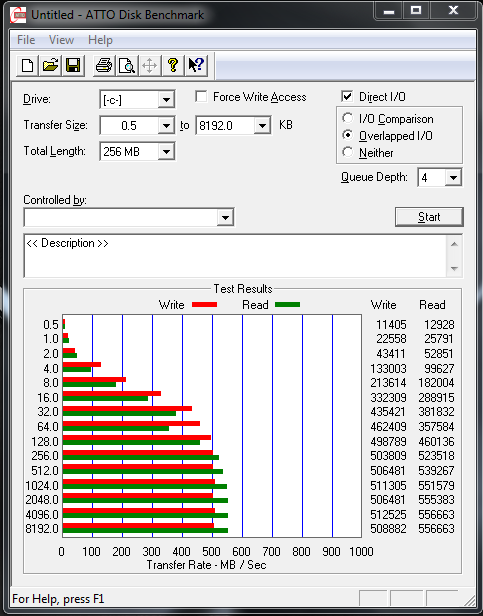
ATTO Disk Benchmark is perhaps one of the oldest benchmarks going and is definitely the main staple for manufacturer performance specifications. ATTO uses RAW or compressible data and, for our benchmarks, we use a set length of 256mb and test both the read and write performance of various transfer sizes ranging from 0.5 to 8192kb. Manufacturers prefer this method of testing as it deals with raw (compressible) data rather than random (includes incompressible data) which, although more realistic, results in lower performance results.
ADATA XM11
SANDISK U100
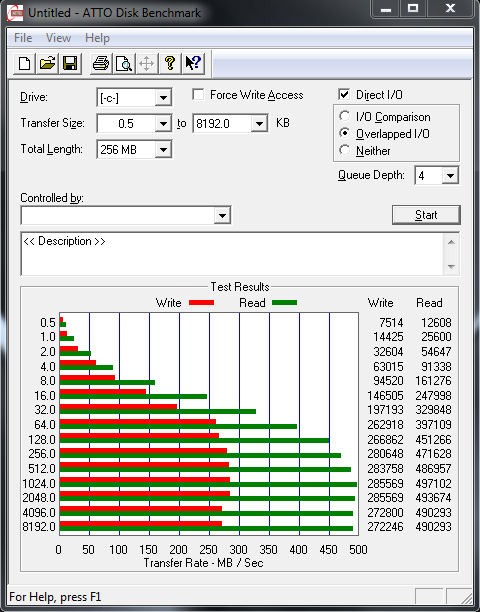 The ‘SandForce Driven’ SSD displayed typical results of 556MB/s read and 508MB/s write while the Sandisk U100 had lower results at 490MB/s read and 272MB/s write. This may be an indication of the direction that we are travelling but, in all honestly, we were happy to see both SATA 3 SSDs performing at their specifications in an ultrabook. You definitely get points here ASUS.
CRYSTAL DISK BENCHMARK VER. 3.0 X64
Crystal Disk Benchmark is used to measure read and write performance through sampling of raw (0/1 Fill/compressible) or random data which is, for the most part, incompressible. Samsung SSDs have similar results regardless of the sample data and our test below shows the worst case test scenario with random or ‘highly incompressible’ data being transferred during the test.
For this test, the AData XM11 is the SSD on the left and the Sandisk U100 is on the right. We will display four results with the top two using highly compressible data samples while the bottom two use incompressible data samples:
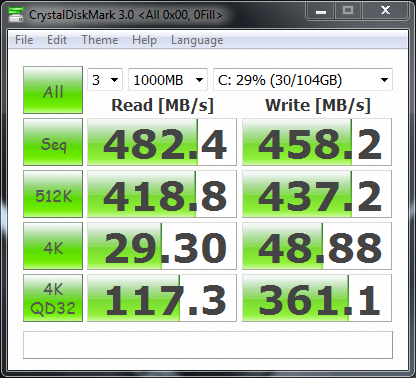
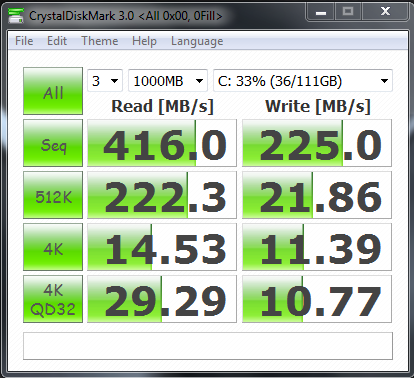 These results were very concerning, especially with respect to the lower three U100 write transfer speeds of 21, 11 and 10MB/s. We were so concerned, in fact, that we did the tests several times and even rebooted the system and checked for any issues that might be hidden in the Device Manager. The results stand, however.
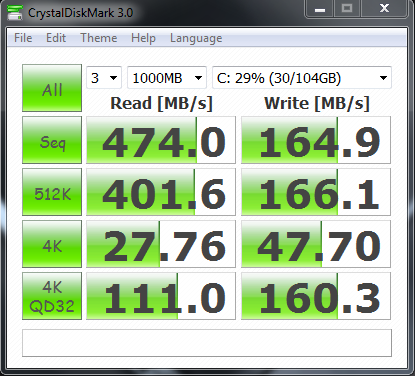
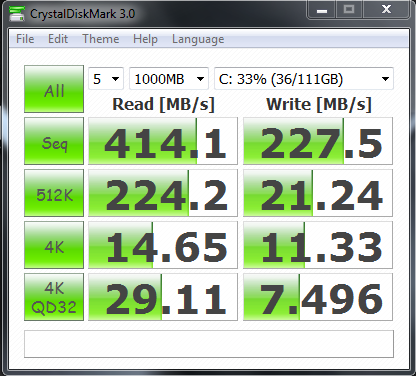 We expected the AData XM11 ‘SandForce Driven’ SSD to to drop in performance a bit when testing highly incompressible data but the U100 results remained to be very concerning, so much so in fact that we elected to follow through with AS SSD tests.
The Sandisk U100 owners at least can laugh at the AData XM11 owners when they stumble on the Sandforce SF-2281 BSOD bug…
Old news and severely blown out of proportion.
My cousin’s OCZ Vertex3 SF drive BSOD almost daily. I don’t think the problem was blown out of proportions…
hello, I know this is a very old article. however i just want to know if i could use the adata xm11 drive in my desktop? can I just plug it into my sata and power connector? thanks
It depends on whether you have the original Zen that we tested in this article, or a newer model with M.2 SATA listed in the specs. Can you advise?
I have a UX31 with a Sandisk U100 and I get the BSOD pretty often as well. I am not a expert, but my guess would be that all since SSD is still a pretty new technology and not that popular as the HDD it’s not yet perfect and still has some issues and bugs.
I have been with SSDs since there first release in 2007 and I wouldn’t believe that your BSODs are common because of it being a new technology. Typically there is another reason which hasn’t yet surfaced. I have been through just about every SSD on the market and run 10 or so systems and laptops and I never experience BODSs randomly.
The SandForce BSOD bug has been fixed as it has been tested and verified by AnandTech and many other publications. I don’t like SandForce, but you have to admit they (or at least Intel) have stabilized their firmware and their SSD’s are now very competitive with the rest.
The SandForce bug was overblown. I couldn’t count the numbet of drives we reviewed and tested an, to this day, I only know of one instance of a drive bricking personally. This is compounded by the fact that I have installed probably over a hundred drives in the past two years for clients in my area and they have yet to experience the issue as well
Is the bug fixed or not? Thanks in advance!
Interesting follow-up to this is that the 256GB SanDisk U100 seems to be far worse– the machine stutters and freezes with even light multitasking and can barely handle 480p local video without stuttering.
Here’s ATTO from my UX31 (results are the same even with less data on the drive): https://img819.imageshack.us/img819/6683/ux31u100atto.jpg
CrystalDiskMark: https://forum.notebookreview.com/attachments/asus/74685d1326647552-ux31-ssd-tips-thread-ux31crystaldiskmark.png
Understandable as the specs would be much the same and for any but typical usage their would be just that.
Thank you very much. As a reviewer, it is hard to make a decision in testing, as with this review, and to decide whether to hold back and get another sample for testing or to go ahead and believe the results are similar to what others have received.
My initial decision relied upon that of other forum posts and its nice to have validation here as well.
This is
totally true, I have a SanDisk SSD U100 256GB in a new ASUS and the performance
is horrible. With all the resources stopped, I’m not able to see a film…
sometimes is stopping!
Do you know if there is a solution or I need to change the hard disk or
computer?
Thank you for the personal experience to validate our findings Pedro and we are sorry of your predicament.
But your blog helps a lot… congratulations… I’m a new fan 😀
By the way… I had been working as a performance consultant with ERP system 12 years ago. I was strange what you mention to turn off the pagefile of Windowns (Totally?), are you sure about this? (I guest that people with just 1GB can’t do it, people with 8GB can do it… but with 4GB???)
Believe it or not, I have been suggesting such since 07 and have watched the world slowly move to my side. 4GB minimum for the typical user is the recommendation. If you have highly intensive needs, I would recommend 8GB but many would be amazed how much they can get going in Win 7 before they resources suffer.
I haven’t had PF on since the day I got 4GB RAM and have never once experienced a warning or problem….and I can be fairly intensive!
Thanks for the answer! I turned off some days ago… and the performance is better (but I’m not very happy with this SDD… it is the third one I have it, and I found it very slow).
Best regards
Unreal. I had no idea there was ever a difference offered, and found this thread while searching for potential firmware updates for the U100. I was quite sure the SSD was my issue, as there was ZERO capability to do any simultaneous disk activity. Unzipping something while surfing the net, and the net crawls because it can’t load pages into cache.
Anyhow, just adding that the disabling of the page file makes a huge improvement. I’m guessing that this disk is so IO thread-limited that performing one operation while Windows swaps to the page file is enough to bring it to its knees. I had monitored in the System Resource Monitor, and found that disk activity looks minimal during times of slowness, but spikes to 10MB/s+ for 10-15 seconds toward the end of a “slow spell”. This suggests a huge queue of IO built up.
Users of the U100 – disable your page file!
Just correcting my above that the sustained spike was 100MB/s, not 10MB/s
It is not really good. I have the pagefile turned off. But some times Windows is not working… and start a crazy state!
@TheSSDReview:disqus, do you know of any 256GB (or larger) SSDs in the same form-factor as the U100? I’d love to replace it, but looks to be a proprietary shape/connector and incompatible with Apple’s SSD pinouts?
A bit surprised that Asus is still using the U100 in the Zenbook Prime series…
The ‘gumstick’ form factor of the Zen is similar but not compatible with its Mac counterpart, so unfortunately the OWC drive will not work. The ONLY other drive that would work is the ADATA twin of that drive that we reviewed and it is not available through consumer sales. Sorry.
For what it’s worth, upgrading to Windows 8 CP gave me a pretty nice bump in SSD performance. A few months in, and while it’s still horrible (gets stuck while switching between desktop and Metro, had a few multi-minute full-system freezes during I/O-intensive tasks, videos are hopeless, etc.), it’s at least better than under Win 7. Also, for some reason, switching to an older version of the Intel AHCI driver gives a 5-10% bump in write performance.
Running only synthetic benchmarks is not enough, I would expect to see some user scenario measurements and also some power consumption comparison.
I got the Zenbook with SanDisk U100 and after 2 weeks I can say that I’m very happy.
The review displays the most realistic method of ‘true user experience’ evaluation seen today with PCMark Vantage and, as well, AS SSD Copy Benchmark is also a true copy test benchmark. There is nothing defective about the U100 whatsoever and in typical use, it would be difficult to differentiate from any other. The difficulty lies in anyone purchasing a system with this ssd for specific uses such as photography, movie editing and whatnot. It took 47 seconds to move a file….those are back to HDD days!
I find an interesting video on YouTube.
Its talking about the Sandisk SSD compared with ADATA that use in Zenbook.
Check it ! LOL
https://youtu.be/QjY7Ki85dWw
Excellent Find!
I’ve had to send my Asus Zenbook UX31 with a SanDisk SSD U100 128GB for an RMA a second time already because the system stuttered, froze, BSOD crashed, and had infinite restart loops into BIOS.The first time I sent it out was for the same reasons and the SSD couldn’t detect the operating system so it was replaced by Asus. Every 2-3 months of heavy usage (leaving the Zenbook on or on standby daily, weekly, or overnight), this BSOD issue happens. Any suggestions for a good SSD replacement/upgrade for the Zenbook?
Because of the blade/gum stick form factor of that SSD, there are no replacements that I am aware of available to the consumer. The only solution I might suggest is to push ASUS to replace it with the SF based model.
Where I can buy an XM11 for my Zenbook ???
Hello, my SSD Zenbook crashed. Do not think he’s anywhere to make the purchase. Do you know where I can make the purchase of this SSD adata?
The only way this SSD can be acquired is through ASUS repair.
Is it just me or do the motherboards on the two computers appear to be different? Why is this?
My UX31E ssd (the sandisk one) crashed as well. Infinite loop in the bios, as it seems to happen to many. Is it possible to replace it with the Adata ssd ? (I am asking because on the pictures the motherboards different – I am not expert)
I have the Sandisk SSD. Could this be the reason my Zenbook 31a freezes and stutters when compressing large files or using bittorrent on a 100 mbit connection? It has been a real disappointment as my old Asus Eeebox 1501p with a 5400 SATA II drive and 1.8 GHz dual core atom felt a lot smoother.
Might there be another more serious hardware problem or is this acceptable when buying an expensive state of the art ultrabook? Im considering trying to get it exchanged at my retailer but I dont want to be without my main computer for whatever time it takes if they are just gonna wipe my install and then return it.
I have heard same from others and that could be attributed directly to that SSD.
My asus zenbook crashed, is there a way to get data out of the ssd. I don’t seem to find any sata adapter to work with this ssd card. Any ideas how to get the data out?
I am not aware of any cards for such either….sorry.
https://www.ebay.com/itm/Asus-UX31-UX21-ADATA-XM11-xm11zzb5-sandisk-to-USB-2-0-CABLE-2-5-3-5-SATA-Adapter-/271115393490
Mine crashed too. Unfortunately the SDD technology is quite poor and the data is unrecoverable. My UX31E Sandisk SDD needed replacing, so I returned the machine for an after warantee repair, the HDD was replaced with another. It crashed 3 months later – after the warrantee of the new replacement I have sent ASUS many emails about this and it seems that ASUS wash their hands of any HDD problems. Don’t buy ASUS, they’re crooks
Sorry to hear of your experience, however, SSD technology is very stable and you got caught in a sub-standard system is all.
Are you aware of any issues in the Asus Zenbook with the 256GB SSDs? I was looking at the UX31A-DH71 which comes with a 256GB SSD. I read somewhere that you may be able to tell what SSD is installed by the serial number of the laptop (that’s on the outside of the box).
You can tell if you can get to the inside box and, as well, if you get to the system itself. If it is a 256GB, it limits the possibilities as I have not seen a SF controlled SSD in a pre-built system with 256GB, although it is possible.
UX31A-BHIT11 (touch screen) has a much better SanDisk drive now than previous UX31A models. I purchased this computer from BestBuy today, and was at first disappointed to find the dreaded SanDisk logo on the inner box. However, I ran some of the benchmarks used here, and my drive has better performance than ADATA XM11! I have included a summary of my test results below vs. scores reported for XM11 in this article.
My drive is: SanDisk SD5SE2128G1002E.
Windows Experience Index (disk data transfer rate) : 8.1 SanDisk vs. 7.9 XM11
AS SSD Benchmark (total score): 750 SanDisk vs. 465 XM11
AS SSD Benchmark (Acc.Time Read / Write): 0.157ms / 0.096ms SanDisk vs. 0.145ms / 0.331ms XM11
My drive also performed favorably on the CrystalDiskMark test (though I neglect to list the actual numbers)
Those arent really fair reflections of that drive and I was curious as to high sequential reads and writes, along with the low 4k writes, even wthout comparison. Can you send those along?
Here are my CyrstalDiskMark 3.0.2 x64 tests using settings for default random data and (x5, 1000MB):
Read [MB/s] Write[MB/s]
Seq 491.2 335.9
512K 290.5 345.5
4K 21.79 41.33
4K QD32 257.9 179.0
Is this what you wanted? If not I can report something else if you can point me in the direction.
“““““““““““““““““““““““““`999999++++++++++++++++++++++++++++
`